
Size & aspect ratio
In the parameter area you can choose the output aspect ratio: Auto or a fixed ratio (e.g. 1:1, 16:9, 9:16) so the result is landscape, portrait, or square.
Models that support extreme ratios also offer 4:1, 1:4, 8:1, 1:8 for banners or tall posters.
This doc describes the aspect ratio dropdown options and how they map to each model.
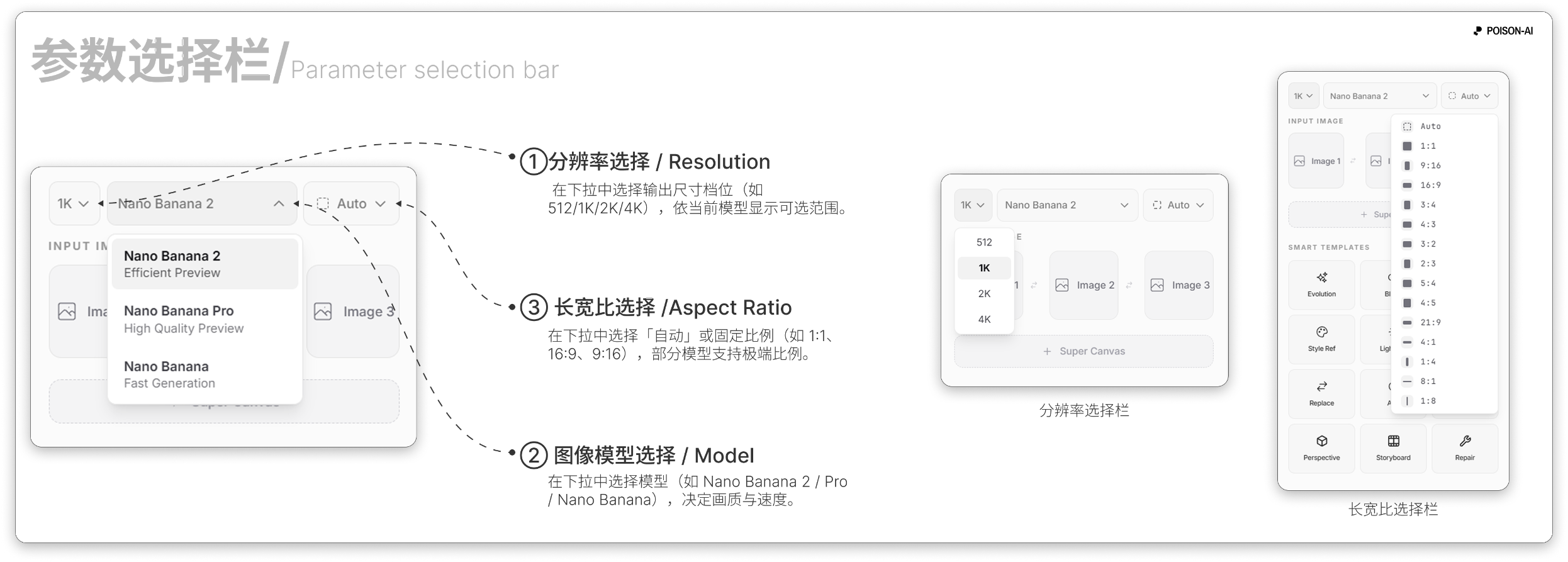
Standard aspect ratios (11)
Nano Banana and Nano Banana Pro use the standard list of 11 ratios:
| Internal | Chinese label | English label |
|---|---|---|
| automatic | 自动 | Auto |
| 1:1 | 1:1 | 1:1 |
| 9:16 | 9:16 | 9:16 |
| 16:9 | 16:9 | 16:9 |
| 3:4 | 3:4 | 3:4 |
| 4:3 | 4:3 | 4:3 |
| 3:2 | 3:2 | 3:2 |
| 2:3 | 2:3 | 2:3 |
| 5:4 | 5:4 | 5:4 |
| 4:5 | 4:5 | 4:5 |
| 21:9 | 21:9 | 21:9 |
Extended aspect ratios (Nano Banana 2 only)
Nano Banana 2 uses the extended list: the 11 above plus 4 extreme ratios:
| Internal | Chinese label | English label |
|---|---|---|
| 4:1 | 4:1 | 4:1 |
| 1:4 | 1:4 | 1:4 |
| 8:1 | 8:1 | 8:1 |
| 1:8 | 1:8 | 1:8 |
- When you switch from Nano Banana 2 to Nano Banana Pro or Nano Banana and the current ratio is one of these extremes, it is reset to Auto so an unsupported value isn’t left selected.
Summary
- Standard (NB / NB Pro): 11 ratios including Auto and 1:1, 9:16, 16:9, 3:4, 4:3, 3:2, 2:3, 5:4, 4:5, 21:9.
- Extended (NB2 only): Those 11 plus 4:1, 1:4, 8:1, 1:8 (15 total).
- The UI uses the standard or extended list based on the current image model; extreme ratios reset to Auto when you change models.
If the product adds or removes ratios, follow the in-app UI.