
Subscription & recharge priority
Two credit types
- Subscription credits: Granted each billing cycle; when used up, you wait for the next cycle or upgrade.
- Top-up credits: Purchased separately; they do not expire with the subscription cycle and can be used as a buffer or between cycles.
Deduction order
The system first uses subscription credits; when those are insufficient, it uses top-up credits.
That way your plan allowance is used first, and top-up acts as backup or for use between renewals.
Refunds are applied back to the same source (subscription vs top-up), and the account balance is updated accordingly.
View and manage
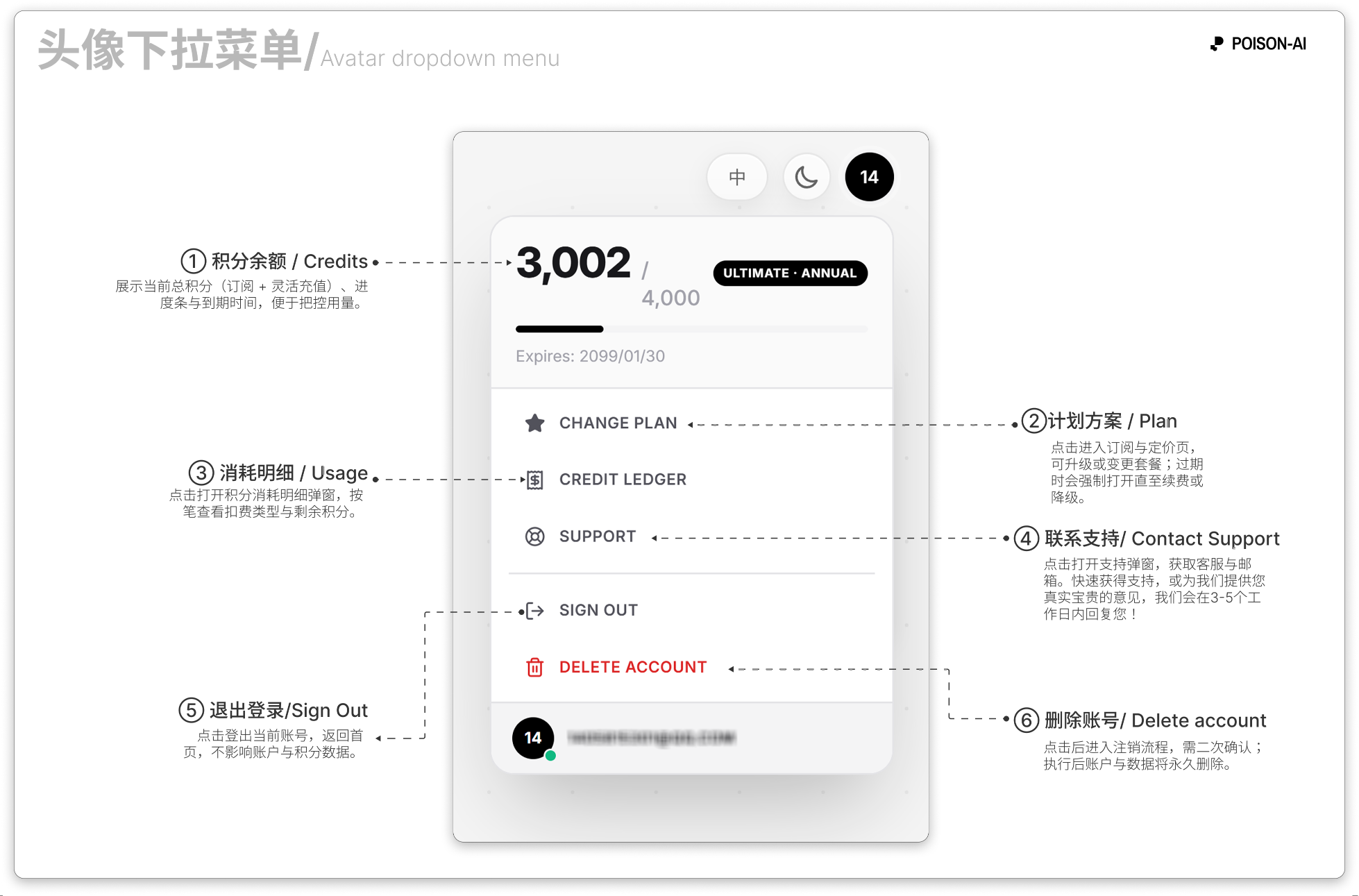
- Click your avatar (top-right) to open the dropdown and see total credits, usage progress, and expiry.
- Upgrade plan / Change plan: Opens the subscription and pricing page. If the subscription is expired, this page may open and stay open until you renew or downgrade.
- Credit usage: View each charge, type (e.g. image, video, enhance, Smart Template), and remaining balance.
- Contact support: Opens the support modal for contact and email; Enter in the modal can copy the email.
- Sign out and Delete account: Sign out or permanently delete the account; account deletion requires confirmation.
For the latest UI and rules, follow the in-app product.